Skip to main
University-wide Navigation

What's New

The TCE Interactive Dashboard is a new way to explore your course evaluation data. In addition to reviewing static PDF reports semester by semester, you can now visualize trends across your teaching history, compare performance between courses, and identify patterns that might not be obvious from individual reports.

Your PDF reports aren't going anywhere. The dashboard is an additional tool that supplements your existing reports. You can continue accessing your familiar PDF format at evaluate.uky.edu/reports exactly as before.

Why Use the Dashboard?

  1. The dashboard is designed to help you answer questions that are difficult to explore with individual PDF reports:
  2. How has my teaching evolved? See your scores plotted over time to identify improvement trends or spot semesters that were outliers.
  3. How do my courses compare to each other? Quickly see which courses receive stronger evaluations and which might benefit from different approaches.
  4. How do I compare to department or college norms? Benchmark your results against pre-calculated averages to understand where you stand relative to peers.
  5. Are there patterns in my data? Filter by course level, delivery mode, or other criteria to discover insights buried in years of evaluation data.

Getting Started Accessing the Dashboard

  1. Navigate to Blue at https://evaluate.uky.edu/Blue/
  2. Log in with your LinkBlue credentials
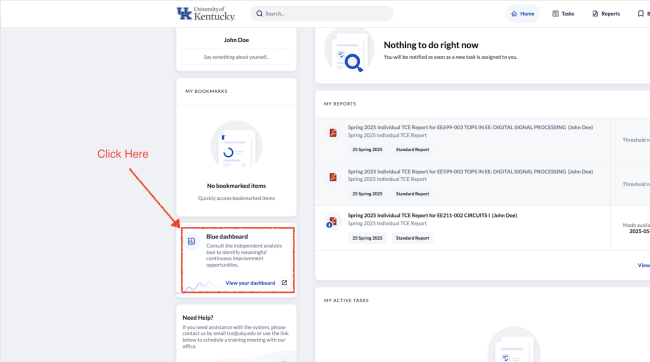
  3. Click "Dashboard" on the left navigation panel


dashboard login

The dashboard will load with your personal evaluation data. Only you can see your individual dashboard—administrators see aggregate data at the department or college level, not individual instructor results.

For a direct access you could bookmark the link https://evaluate-bc.uky.edu/BlueDashboard.aspx

Available Data
 

The dashboard contains your evaluation data from Fall 2017 through Fall of 2025, covering all courses and sections you taught during this period. This is the same data available in your PDF reports, presented in an interactive format.

A Note on Privacy Thresholds

To protect student anonymity, results are only displayed when a course section receives 5 or more responses. If you taught a small seminar or independent study with fewer than 5 respondents, those results will not appear in the dashboard (or in PDF reports). This threshold ensures that individual student feedback cannot be traced back to specific respondents.

Dashboard Views

The dashboard offers two primary views, accessible via tabs at the top of the screen.


Dashboard Landing Page

Trend Analysis View

The Trend Analysis view is the heart of the dashboard. It displays line graphs showing your evaluation scores over time, with separate visualizations for different question groups:

Question Groups Explained
Question Group What It Measures
Course Quality Single question: "I consider this to be a quality course"
Course Questions Overall Average of all 6 course-related evaluation questions
Instruction Quality Single question: "This instructor provided quality teaching"
Instructor Questions Overall Average of all 7 instructor-related evaluation questions

Each graph plots your scores across semesters, making it easy to see whether your evaluations are trending upward, holding steady, or showing variation that warrants attention.

Using Trend Analysis
  • Adjust the time range: Select which semesters to include in your analysis. You can view up to nine time periods at once.
  • Change the anchor period: Use the arrow buttons to shift focus to a specific semester and see detailed data for that period.
  • Filter your data: Narrow results to specific courses, prefixes, or delivery modes to isolate patterns.


Course Sections View

This view provides a detailed breakdown by individual course section, allowing you to examine results at a more granular level than the trend graphs provide.

The Comparison Feature

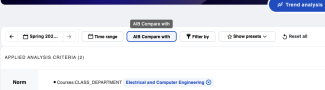
One of the dashboard's most powerful capabilities is the ability to compare your results against benchmarks. Access this feature using the "Compare with" option in the dashboard controls.


Compare icon

Comparison Options


Trend Analysis Page

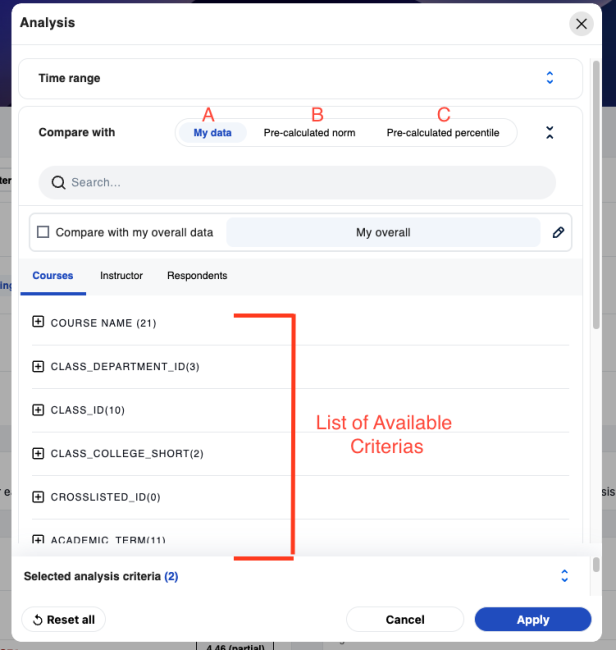
(A)My Data (Breaking Down Your Own Results)

Select demographic criteria to slice your data in different ways. For example, you might compare:

  • Your 100-level courses vs. 400-level courses
  • Your online sections vs. in-person sections
  • Performance in one course vs. another
(B)Pre-calculated Norms

Compare your results against department or college averages. This helps answer the question "How do I stack up?" A few things to know:

  • You can only see norms for units you belong to. If you teach in the Biology department, you can compare against the Biology department norm, but not the Chemistry department norm.
  • Norms are calculated across all instructors in that unit, providing a meaningful benchmark.
  • Norms remain constant regardless of filters you apply to your own data.
(C)Pre-calculated Percentiles

Go beyond averages to see where you rank. Percentiles tell you what proportion of instructors in your comparison group scored below you. For example, if you're at the 80th percentile, you scored higher than 80% of instructors in that group—even if your score is above or below the group average.


Dashboard Controls Reference

Header Controls


header control

Control Function
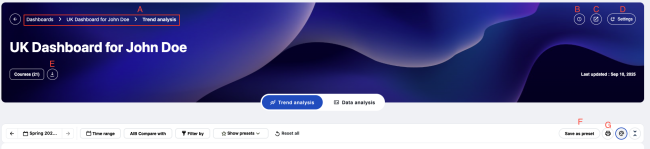
A. Breadcrumb navigation Shows your current location in the dashboard; click to navigate back
B. (i) Icon Displays legend information explaining symbols and colors
C. Pop-out button Opens the dashboard in a new browser tab or window
D. Settings (gear icon) Customize display options, select which statistics to show, reorder views
E. Export Download your raw response data as CSV files for use in external analytics tools
F. Save As Preset Save current Filters/Comparison as a preset for future use
G. Print Export the current view into a printable PDF

Time Controls

  • Anchor time period: The currently selected semester, highlighted on your charts. Use left/right arrows to move between semesters, or click to jump to a specific period.
  • Time range selector: Choose which semesters appear in your trend charts. Click and drag to select a range, then click Apply.
  • Time scale: Switch between semester-based and year-based views depending on how you want to aggregate your data.


Understanding Your Scores

What the Numbers Mean

TCE questions use a 5-point scale where higher scores indicate more positive evaluations. When interpreting your scores:

  • Look at trends, not just individual numbers. A single semester can be affected by many factors. Patterns over time tell a more reliable story.
  • Context matters. Course difficulty, class size, required vs. elective status, and delivery mode all influence evaluations. Use filters and comparisons to account for these factors.
  • Use norms as benchmarks, not judgments. Being above or below a department average provides context, but evaluations are one of many indicators of teaching effectiveness.

When Data Doesn't Appear

If you're missing expected data, common reasons include:

  • Response threshold: Sections with fewer than 5 responses are suppressed to protect anonymity.
  • Data range: Only evaluations from Fall 2017 forward are included.
  • Processing time: Recent semester data may take a few weeks to appear after grades are submitted.